Track Custom Events by User in React Native & Web Analytics
Events tell you what happened. Now see who did it.
Feb 23, 2025
Jump to section
Custom events tell you what happened. Now you can see who did it — and watch their replay.
Custom events are one of the most powerful features in Vexo's React Native and Web analytics. They let you track exactly what matters to your app — signups, purchases, feature usage, errors, anything you define. But until now, you could see that events happened without easily seeing which users triggered them.
That changes today.
User Attribution on Custom Events
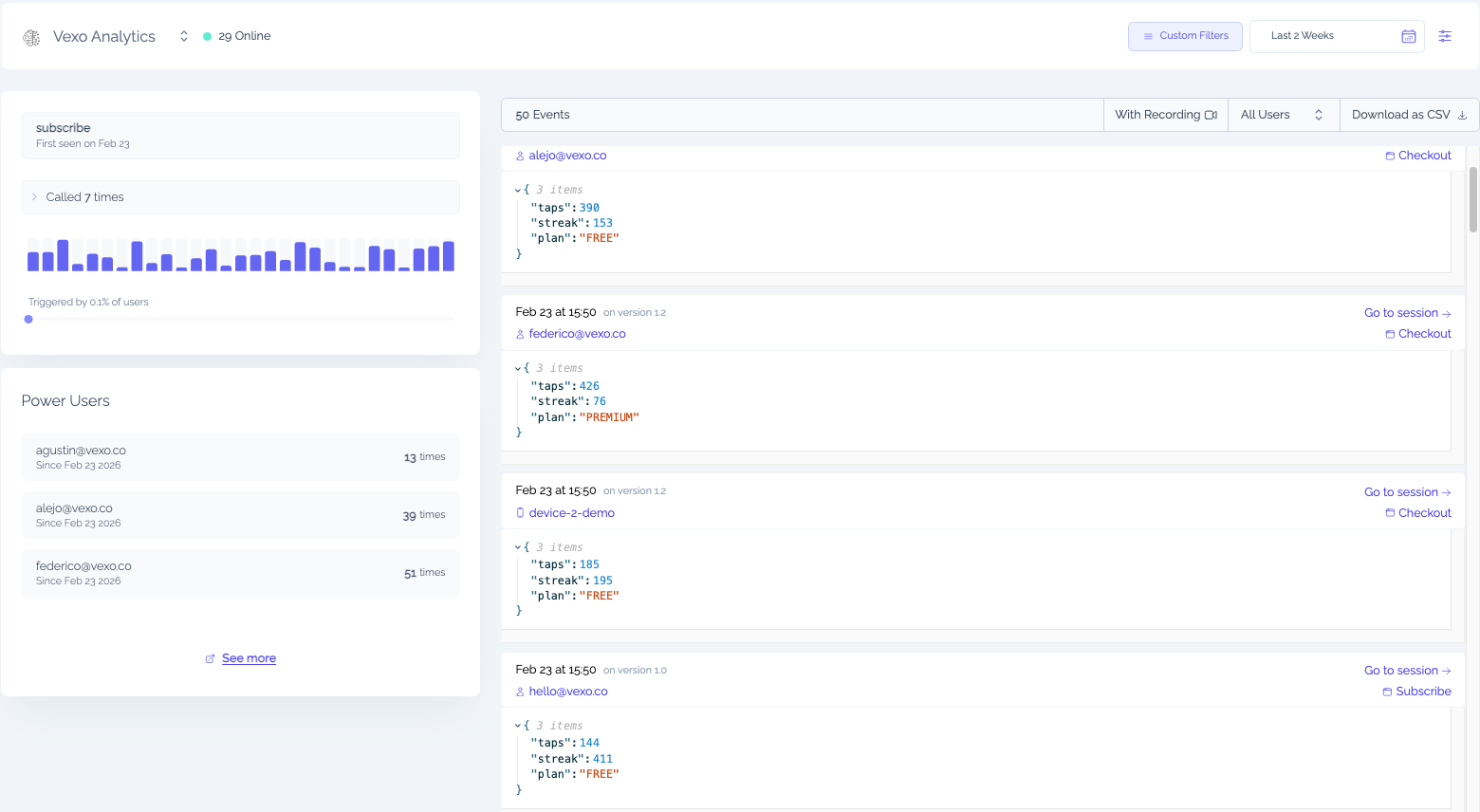
When you open any custom event in Vexo, you'll now see a user filtering dropdown. Type to search for a specific user by email or device ID, and the results show your power users first — the ones who trigger this event most frequently.
Click any user to jump straight to their profile, with your current filters preserved. Or, if there's a session replay attached, click "Watch replay" to see exactly what happened.
This makes debugging specific user issues significantly faster. Instead of searching through sessions hoping to find the right one, you start from the event and work backward:
- Open the custom event
- Find the user (or browse power users)
- Click through to their replay
Three clicks from "this event fired" to "here's what the user was doing."
Power Users Per Event
Vexo's power users feature deserves its own mention. For every custom event, Vexo now surfaces the users who trigger it most frequently.
This is useful in several ways:
- Identify your most engaged users — who's using a feature heavily?
- Spot problematic patterns — is the same user hitting an error repeatedly?
- Find your champions — who are the power users of your most important flows?
Power users are ranked by count and available directly in the event detail view. No extra setup, no separate report.
Filter to Events with Replays
Sometimes you just want to see the events where you can actually watch what happened. The new "With Recording" toggle filters your event list to only show events that have session replays attached.
One click. No more opening events to check if there's a replay, then backing out when there isn't.
This pairs well with user filtering. Filter to a specific user, toggle "With Recording," and you've got a focused list of watchable moments from that user's sessions.
Global Filters Work Everywhere
We've also improved how filters behave across Vexo. Date range, country, OS, and version filters now apply consistently to:
- Device pages
- Custom events
- Session lists
- Event distributions
Set a filter in one view, navigate to a related page, and your filters come with you. No more resetting filters as you move between views.
This sounds small, but it removes real friction. You can drill into a specific cohort — users in Germany on iOS 17, for example — and stay in that context as you explore.
Try It Today
These features are live now. If you're already tracking custom events, open any event and you'll see the new user dropdown and replay toggle.
If you're not tracking custom events yet, check out the docs to get started.
Questions or feedback? Reach out at hello@vexo.co or join our Discord. We're listening.