Heatmaps
for React Native
Vexo heatmaps visualize user tap patterns in your React Native app. Identify hotspots, dead zones, and optimize your UI with real data—no guessing.
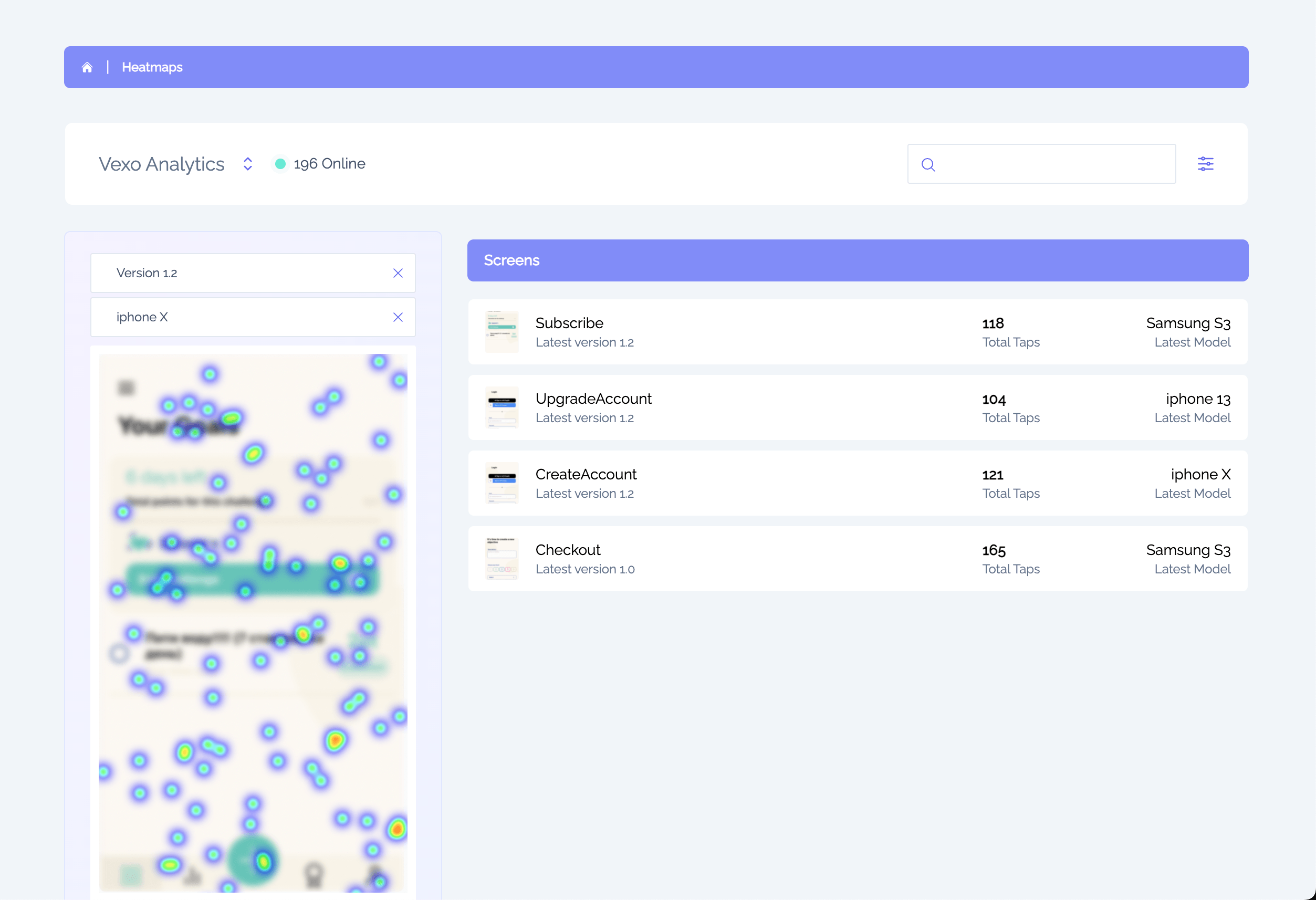
Add Heatmaps in Seconds
Heatmaps are automatically enabled when you integrate Vexo. No additional configuration required—just install and go.
1. Install the package
npm install vexo-analytics2. Add to your app entry point
import { vexo } from 'vexo-analytics';vexo('YOUR_API_KEY');// Heatmaps are now enabled automatically.Included with every plan: Heatmaps, session replays, and automatic event tracking are all enabled with the same integration. No extra setup needed.
Why Mobile App Heatmaps Matter
Mobile app heatmaps are essential for understanding how users actually interact with your React Native app. Unlike traditional analytics that show you numbers and charts, heatmaps provide a visual representation of user behavior—making it instantly clear which parts of your UI work and which don't.
When you track user behavior with heatmaps, you discover patterns that metrics alone can't reveal. You'll see rage taps on unresponsive elements, dead zones where users expect interactions, and exactly which CTAs drive engagement. This data is invaluable for teams looking to improve mobile app UX based on real evidence rather than assumptions.
For React Native and Expo developers, Vexo provides the only heatmap solution built specifically for your stack. While tools like Firebase offer basic analytics, they lack visual behavior tracking. Vexo fills this gap with tap heatmaps, session replays, and automatic event tracking—all enabled with a single line of code.
Everything You Need for React Native Heatmap Analytics
From tap visualization to device filtering, Vexo provides comprehensive mobile app heatmaps built for React Native developers.
Tap Density Visualization
See exactly where users tap with color-coded heatmaps. Red for hotspots, blue for cold zones.
Version Comparison
Compare heatmaps across app versions. Validate UI changes with real user data.
Device Filtering
Filter by iPhone, Android, or specific models. Identify device-specific issues.
Dead Zone Detection
Find areas where users tap expecting functionality. Discover missing interactions.
Session Replays
Dive deeper with full session recordings. See the context behind the taps.
Screen-by-Screen
Heatmaps for every screen in your app. Navigate and analyze each view.
Privacy-First
Only tap coordinates captured. No screenshots, no PII, GDPR compliant.
Real-Time Updates
Heatmaps update as users interact. See patterns emerge in real-time.
What Can You Do with Heatmaps?
Heatmaps transform raw tap data into actionable UX insights. Stop guessing and start optimizing.
Optimize CTAs & Buttons
Heatmaps reveal which buttons users actually tap. Move or resize CTAs based on real engagement data.
Find Dead Zones
Discover areas where users tap expecting an interaction. Add functionality or clarify UI elements.
Validate Redesigns
Compare heatmaps before and after UI changes. Ensure new designs improve engagement.
Improve Accessibility
Ensure touch targets are large enough across all devices. Fix usability issues for all users.
Why Choose Vexo for React Native Heatmaps
See how Vexo compares to other React Native heatmap solutions.
| Feature | Vexo | UXCam |
|---|---|---|
| 1-Line Integration | ||
| Tap Density Heatmaps | ||
| Version Comparison | ||
| Device Model Filtering | Limited | |
| Session Replays Included | ||
| Privacy-First (No Screenshots) | ||
| Free Tier | 2,000 heatmaps | Trial only |
| Expo Support | Limited | |
| Flat Pricing |
Works With Your Stack
Seamless heatmap integration for React Native and Expo.
Subscription Plans
Pricing that fits your needs
Try it out
For small apps or development phase
Free
- Up to 500K/mo events
- 1,000 session replays included
- Session replays & heatmaps included
- 2 free seats
Premium
Perfect option for your next project.
$0
- Up to 500K events
- 1,000 session replays included, then $3 per 1,000
- Unlimited heatmaps
- 2 seats included
- Full access to all features
Enterprise
Perfect option for apps with high user base.
Contact Us
- Up to 1+ Billion events
- 1,000 session replays included, then $3 per 1,000
- Unlimited heatmaps
- 10 seats included
- Full access to all features
- Onboarding and customer success
- Custom configuration
Data retention
We keep your sessions, replays & events for 60 days on the free plan and 24 months on paid plans. Aggregated metrics are kept even longer. Need more history? Extend retention to 3, 4 or 5 years with the extended-retention add-on (from 1 November 2026).
Frequently Asked Questions
Everything you need to know about adding heatmaps to your React Native app.
- What is a mobile app heatmap?
- A mobile app heatmap is a visual representation of where users tap in your React Native app. Colors indicate interaction density—red and orange show high-activity areas (hotspots), while blue and green show low-activity areas (cold zones). Mobile app heatmaps help you track user behavior and understand interaction patterns at a glance without watching individual sessions.
- How do heatmaps help track user behavior in mobile apps?
- Heatmaps aggregate tap data from all your users to show exactly where people interact with each screen. This helps you track user behavior patterns, identify which buttons get the most engagement, find dead zones where users tap but nothing happens, and understand how users navigate your React Native app. It's essential mobile app analytics for improving UX.
- How are React Native heatmaps generated?
- The Vexo SDK captures anonymized tap coordinates from your React Native app. It records where users touch the screen, aggregates this data across all users, and creates a visual overlay showing interaction density on each screen. No screenshots or personal data are captured—only x/y coordinates. This makes Vexo a privacy-first mobile analytics solution.
- Does Vexo heatmaps work with Expo?
- Yes, Vexo provides full Expo analytics support including heatmaps. Simply install vexo-analytics, add the initialization code, and create a development build using EAS Build or expo prebuild. Note that Expo Go is not supported due to its limitations with native modules, but all Expo Development Builds work seamlessly with heatmaps, session replays, and all other features.
- How can heatmaps help debug mobile app user issues?
- Heatmaps help you debug mobile app user issues by revealing where users struggle. If you see concentrated taps on non-interactive elements, users expect functionality that doesn't exist. If important buttons have few taps, they may be hard to find. Combined with session replays, you can identify exactly why users drop off and fix UX problems quickly.
- How do I use heatmaps to improve mobile app UX?
- To improve mobile app UX with heatmaps: 1) Identify hotspots to understand what users engage with most, 2) Find dead zones where users tap expecting interactions, 3) Compare heatmaps across app versions to validate design changes, 4) Filter by device to ensure touch targets work on all screen sizes. This data-driven approach removes guesswork from UX optimization.
- Can I compare heatmaps across app versions?
- Yes, Vexo automatically segments heatmaps by app version. When you release a new version, heatmaps are generated separately. You can compare side-by-side to see how UI changes affect user interaction patterns—essential for validating redesigns and A/B testing different layouts in your React Native app.
- Can I filter heatmaps by device model?
- Yes, you can filter heatmaps by device model (iPhone 15, Pixel 8, Samsung Galaxy, etc.) to see how interactions differ across screen sizes. This helps identify touch targets that may be too small on certain devices or layout issues specific to certain models—critical for mobile app analytics across diverse Android and iOS devices.
- Do heatmaps affect React Native app performance?
- No. Vexo heatmaps have minimal performance impact—less than 1% CPU overhead. The SDK captures tap coordinates asynchronously and batches data before sending it to our servers. Your React Native app users never experience any slowdowns. This lightweight approach is why Vexo is trusted for production mobile app analytics.
- What's the difference between heatmaps and session replays?
- Session replays show individual user journeys as video recordings, while heatmaps aggregate data from many users to show where people tap most. Use session replays for debugging specific mobile app user issues; use heatmaps to reveal overall UX patterns and track user behavior at scale. Vexo provides both with a single 1-line integration.
- Is Vexo a good alternative to Firebase for React Native analytics?
- Yes, Vexo is built specifically as a React Native analytics solution, unlike Firebase which is a general-purpose tool. Vexo offers features Firebase lacks: tap heatmaps, session replays, and automatic event tracking with just 1 line of code. For teams that want mobile app analytics designed for React Native and Expo, Vexo is the best Firebase alternative.
- Is heatmap data private and GDPR compliant?
- Yes, Vexo heatmaps only capture tap coordinates—no screenshots, personal data, or screen content. All data is anonymized and aggregated. Vexo is fully GDPR compliant and never sells your data. This privacy-first approach makes Vexo suitable for mobile apps in regulated industries.
Can't find the answer you're looking for? Contact our team or join our Discord
Start Visualizing User Behavior Today
Join thousands of React Native developers using Vexo heatmaps to optimize their apps. Free forever for small apps.
No credit card required. Set up in under 2 minutes.