Custom Event Tracking
for Mobile Apps
Track purchases, signups, and any business action — then filter your session replays to watch exactly what happened. Vexo enriches every event with screen, device, and user data automatically.
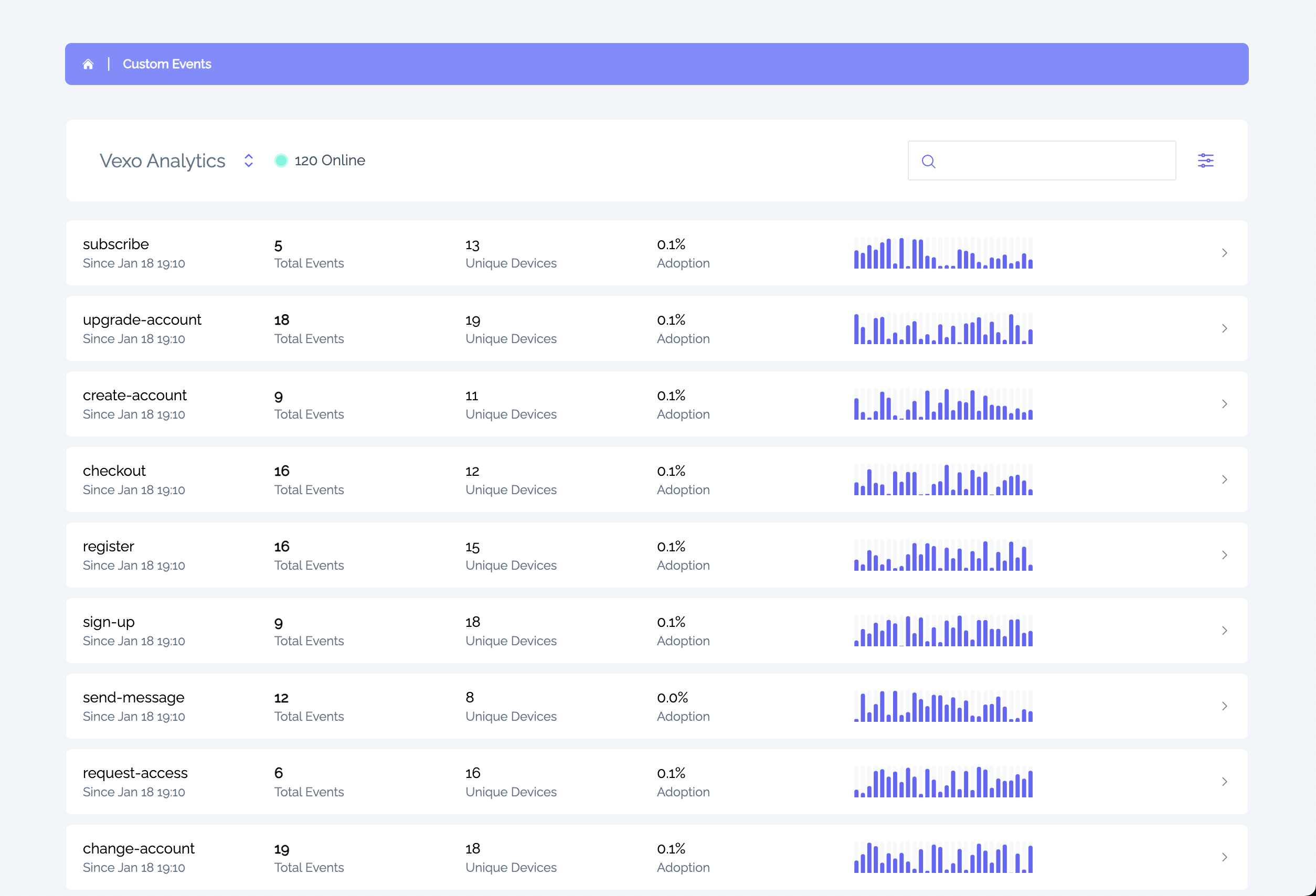
Custom Events Without the Complexity
Other analytics tools require extensive setup for every event. Vexo handles the context automatically.
Other Analytics Tools
- Manual property mapping for every event
- Complex SDK initialization and configuration
- Separate code for user identification
- Missing context requires debugging guesswork
- Per-event pricing that scales unpredictably
Vexo Custom Events
- Filter session replays — find sessions where events occurred
- Automatic context — screen, device, location added for you
- Built-in user attribution — see who triggered each event
- Simple function call — just import and track
- Flat-rate pricing — predictable costs that scale
Mobile App Analytics That Goes Beyond Event Counting
Vexo transforms your custom events into actionable insights. Track user behavior, filter session replays, and understand your mobile app users.
Session Replay Filtering
Filter session replays by custom events. Watch exactly what users did before and after triggering key business events.
User Attribution
See exactly which users triggered each event. Click to view their full session, profile, and behavior patterns.
Automatic Context Enrichment
Every custom event automatically captures screen name, device info, app version, and location. You send the event; we add the story.
Custom Dashboards
Build visual dashboards with your key events. Drag, drop, and share with your team for real-time business insights.
Cross-Platform Unified
Track the same events across React Native and Web. Compare funnels and see cross-platform user journeys in one view.
Trend Analysis
Visualize event trends over time. Track total and unique counts, compare across app versions, and spot patterns.
Track User Behavior Across Industries
Custom event tracking patterns for mobile apps. See how teams use Vexo to understand user behavior.
E-commerce & Retail
Track purchases, cart additions, checkout starts, and abandonment. See revenue per user and identify drop-off points.
purchase-completedadd-to-cartcheckout-startedcoupon-appliedSaaS & Subscriptions
Measure feature adoption, trial conversions, and subscription events. Understand what drives upgrades.
feature-usedtrial-startedsubscription-upgradedonboarding-completedGaming & Entertainment
Track level completions, in-app purchases, achievements, and engagement milestones across your game.
level-completedachievement-unlockediap-purchasedsession-milestoneMedia & Content
Monitor content consumption, subscription events, share actions, and engagement with your media app.
content-viewedcontent-completedshare-clickedbookmark-addedVexo vs Other Mobile Analytics Platforms
Compare custom event tracking features. See why teams choose Vexo over Firebase, Amplitude, and Mixpanel for React Native analytics.
| Feature | Vexo | PostHog | Amplitude | Mixpanel |
|---|---|---|---|---|
| Automatic Context Enrichment | ||||
| Filter Session Replays by Event | ||||
| User Attribution | ||||
| React Native First | ||||
| Mobile Heatmaps | ||||
| Custom Dashboards | ||||
| Flat-Rate Pricing |
Subscription Plans
Pricing that fits your needs
Try it out
For small apps or development phase
Free
- Up to 500K/mo events
- 1,000 session replays included
- Session replays & heatmaps included
- 2 free seats
Premium
Perfect option for your next project.
$0
- Up to 500K events
- 1,000 session replays included, then $3 per 1,000
- Unlimited heatmaps
- 2 seats included
- Full access to all features
Enterprise
Perfect option for apps with high user base.
Contact Us
- Up to 1+ Billion events
- 1,000 session replays included, then $3 per 1,000
- Unlimited heatmaps
- 10 seats included
- Full access to all features
- Onboarding and customer success
- Custom configuration
Data retention
We keep your sessions, replays & events for 60 days on the free plan and 24 months on paid plans. Aggregated metrics are kept even longer. Need more history? Extend retention to 3, 4 or 5 years with the extended-retention add-on (from 1 November 2026).
Custom Event Tracking FAQ
Common questions about custom event tracking for React Native, Expo, and mobile apps.
- What is custom event tracking in mobile app analytics?
- Custom event tracking lets you measure specific user actions in your mobile app—purchases, signups, feature usage, or any business-critical interaction. Unlike automatic tracking, custom events give you control over exactly what to measure and what metadata to include. Vexo makes custom event tracking simple for React Native and mobile apps with automatic context enrichment.
- How do I add custom event tracking to a React Native app?
- With Vexo, adding custom event tracking to React Native is straightforward. Once you have the SDK installed, import the customEvent function and call it anywhere: `customEvent('purchase-completed', { amount: 99.99 })`. Vexo automatically enriches your event with screen name, device info, app version, and location—making React Native analytics effortless.
- Can I filter session replays by custom events?
- Yes! This is one of Vexo's most powerful features for mobile app analytics. You can filter session replays by any custom event to watch exactly what users did before and after triggering that event. This makes debugging mobile app user issues much faster—you see the full context of user behavior around any business event.
- Does Vexo custom event tracking work with Expo?
- Yes, Vexo fully supports Expo apps with Development Builds. Custom event tracking works identically in Expo as in React Native CLI projects. Simply install vexo-analytics, add the initialization, and use customEvent() anywhere in your Expo app. This makes Vexo the ideal analytics solution for Expo developers.
- How does Vexo compare to Firebase for custom event tracking?
- Unlike Firebase Analytics, Vexo provides automatic context enrichment for every custom event—screen name, device info, location, and app version are added without extra code. Vexo also offers session replay filtering by event (which Firebase lacks), user attribution, and flat-rate pricing. For React Native apps, Vexo is purpose-built while Firebase is a general-purpose tool.
- What user behavior data is captured with custom events?
- Vexo automatically enriches every custom event with: the screen where the event occurred, device information (OS, model, screen size), app version, user location, session context, and timestamp. You can also add custom properties. This lets you track user behavior in your mobile app with full context for every event.
- Can I see which users triggered each custom event?
- Yes! Vexo's user attribution feature shows exactly which users triggered each custom event. Click any event to see user profiles, session history, and the full context. This is essential for understanding mobile app user behavior, debugging issues, and identifying your most engaged users.
- How do custom events work with mobile app funnel analysis?
- Custom events are the building blocks for funnel analysis in Vexo. Track events like signup-started, profile-completed, and first-purchase to build conversion funnels. Vexo shows drop-off rates at each step, and you can click through to session replays to understand why users abandon your mobile app funnel.
- Is there a limit to custom events in mobile analytics?
- There's no limit to the number of unique custom event types you can define in Vexo. Your plan determines total event volume (automatic + custom combined). The free tier includes 100,000 events per month—perfect for mobile startups. Premium plans scale to handle enterprise mobile apps with billions of events.
- Do custom events work across React Native and web?
- Yes, custom events work identically on React Native (iOS/Android) and web applications. Track the same events across platforms and see unified analytics in one dashboard. This lets you compare user behavior across mobile and web, track cross-platform user journeys, and understand your full product analytics picture.
Have more questions? Contact our team or join our Discord
Start Tracking User Behavior Today
100,000 events free every month. The best mobile app analytics for React Native and Expo. Set up custom event tracking and start filtering session replays.
Join 500+ mobile app teams tracking custom events with Vexo.
More Mobile App Analytics Resources
Session Replays for React Native
Watch real user sessions and filter by custom events to debug mobile app issues.
FeatureReact Native Analytics Platform
The complete analytics platform built for React Native and Expo apps.
DocumentationCustom Events Integration Guide
Step-by-step guide to add custom event tracking to your React Native app.