Session Replay for Expo: Monitoring Managed Workflow Apps
Track Feature Adoption with Vexo: Enhance Debugging in Expo Without Ejecting
March 5, 2026
Jump to section
Incorporating runtime analytics into Expo has shown to improve real-time diagnostics for 50% of developers.
Vexo takes this a step further by seamlessly integrating with EAS Build and Over-the-Air (OTA) workflows to provide powerful session replay capabilities, all without the need to eject your app.
Whether you're troubleshooting or optimizing user flows, Vexo enables you to capture and review every interaction, error, and network request within Expo.
With this integration, you can enhance debugging efficiency, improve app stability, and streamline your development process, all while maintaining the simplicity and flexibility of Expo's managed workflow.
Integrating Vexo with Expo Managed Workflow for Better Debugging
Vexo stands out by fully integrating with the Expo managed workflow, allowing developers to gain full visibility into user behavior and errors without needing to modify the app.
Unlike other tools, Vexo helps developers monitor and debug their apps without having to eject them.
The integration is simple and uses a standard npm/yarn dependency along with a runtime initializer, ensuring that there's no need for native project file modifications. You can run the app directly inside the Expo managed workflow, simplifying the development process.
Key Integration Highlights:
- No native code modifications: Vexo works seamlessly without altering iOS or Android native files.
- Simple setup: Integrate Vexo via npm/yarn and a runtime initializer, with no native project changes required.
- Expo support: Works with Expo on both iOS and Android for real-time testing.
- EAS Build and OTA compatibility: Integrates with EAS Build and EAS Update (OTA), allowing you to ship monitoring updates without needing to resubmit to App Store or Play Store.
Expo documentation confirms that Expo runs on both iOS and Android, and EAS provides cloud build and OTA update tooling, making the integration process even more efficient.
Session Replay: Capturing Critical Data in Expo
Session Replay captures four primary telemetry categories: UI interactions, JavaScript errors, network requests, and console logs—each tied to a timestamped visual timeline.
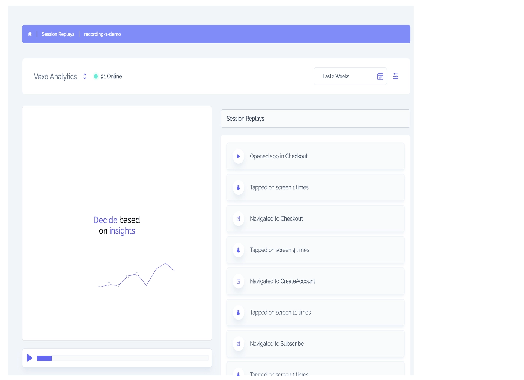
These categories map directly to the data developers use to reproduce bugs: gestures, screen navigation, XHR/fetch calls, and runtime exceptions.
You can view replays recorded on Expo devices immediately after a session ends, because the SDK records events in-memory and uploads compressed payloads when connectivity is available.
How Vexo Reduces MTTR and Improves Developer Productivity
Session Replay shortens mean time to repair by replacing speculative debugging with visual reproduction. Developers observe the exact UI state, network calls, and console output in a single view. Visual context transforms hours of log triangulation into minutes of inspection.
Since Vexo ties each replay to build metadata and OTA channel, teams can isolate regressions to specific EAS Build profiles or OTA releases. This makes it easy to roll back or patch the exact channel that introduced the issue.
Filtering by build ID and OTA channel removes guesswork when multiple release channels are active.
Events and Metrics You Can Track with Vexo in Expo
Vexo captures standard telemetry out of the box: uncaught exceptions, handled errors, custom tracked events, navigation events, network requests, and console output—covering at least six actionable event types used in debugging workflows. Each event is timestamped and correlated to the visual replay timeline.
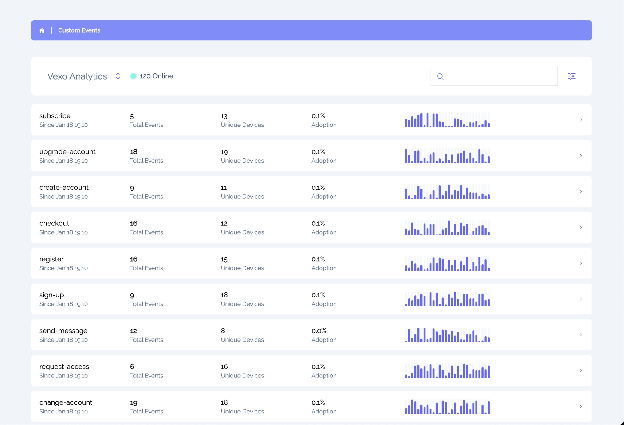
Custom events and user properties are supported, enabling product metrics such as feature adoption, funnel drop-off points, and session duration to be combined with replay for qualitative analysis.
Combining quantitative funnels with replay reduces ambiguity when interpreting why users drop from flows.
Comparing Analytics Options for Expo
Choose a tool that supports managed Expo, provides session replay, and does not require native code changes for minimal disruption to your workflow. Vexo targets that intersection specifically for teams using EAS Build and OTA updates.
| Tool | Session Replay | Managed Expo Support | Native Setup Required |
|---|---|---|---|
| Vexo | Yes, visual replays with network & errors | No, works in Expo managed | No native edits required |
| Sentry | Limited / optional Replay product | Partial, SDK works, some features need native | Often requires native SDK steps for full features |
| Firebase Analytics | No native session replay | Works for events, but no visual replays | May require native setup for full capabilities |
Get Started with Vexo and Start Reducing Your MTTR Today
Stop guessing and start debugging with precision. With Vexo's Session Replay, you'll be able to reduce your MTTR and eliminate the uncertainty of Heisenbugs in your Expo managed workflow apps.
Start with Vexo today and experience how easy it is to debug mobile crashes with visual context and actionable insights. Get started with a free trial now and see the difference in your debugging workflow.
Frequently Asked Questions
What are the best analytics tools for Expo?
The best analytics tools for Expo are those that integrate seamlessly without requiring you to eject. Vexo offers full session replay, error tracking, and custom events while working entirely within the Expo managed workflow.
Can I use session replay without ejecting my Expo app?
Yes. Vexo's session replay works completely within Expo's managed workflow. You install it via npm/yarn and initialize it at runtime—no native code modifications required.
How does Vexo integrate with EAS Build?
Vexo automatically captures build metadata from EAS Build, allowing you to filter sessions by build ID and OTA channel. This makes it easy to identify which release introduced a specific issue.
