The Cost of Bugs: Why Early-Stage Startups Need Vexo
Fast, Actionable Insights for Startup Survival
March 9, 2026
•Updated: November 7, 2026
Jump to section
Why Bugs Are Existential for Early-Stage Startups
Startups operate on thin runways. According to the U.S. Bureau of Labor Statistics, around 20% of new firms fail within their first year, and about half by year five. When every month counts, a bug costs you twice: once in the users who quietly leave, and again in the engineering days you spend finding it.
For a small React Native team, the second cost is the one you feel first. The fix is often a few lines. The expensive part is everything before it: working out which release broke, which devices are affected, which screen it happened on, and what the user did right before. On a team of three engineers, a day spent reproducing one crash is a day nobody ships.
This guide shows where that time goes and how to set up a React Native or Expo app so that the next bug report arrives with evidence attached.
Why Traditional Analytics Aren't Enough
Events, funnels, and dashboards tell you that something went wrong: conversion on the paywall dipped, or sessions on the new release got shorter. They rarely tell you why. A funnel shows the step where users stop. It doesn't show the dropdown that never opened on a small Android screen.
Every bug report leaves the same four questions open. Until you can answer them, you're guessing:
- What did the user do right before it broke? The screens, taps, and UI state that led to the failure.
- Which release, and how many people? Whether the problem is new in the latest version, and how many devices hit it.
- What did the app get back from the network? The request that timed out or returned an error behind a spinner.
- Where in your code did it fail? A readable stack trace and the logs around it.
Without that context, teams fall back on the slow loop: add logging, ship a build, wait for the bug to happen again. Each pass costs days.
How Session Replay Transforms Problem-Solving
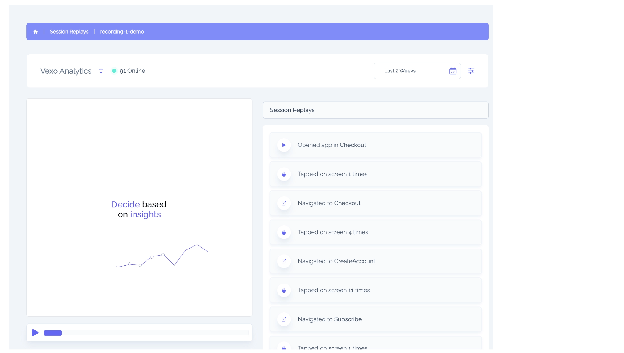
Session replay answers the first question directly. Vexo records replays automatically once the SDK starts, with privacy blur on by default, at roughly 200 KB per minute of recording. You watch the exact screens and taps that led to the failure instead of reconstructing them from a support ticket.
The replay matters more because of what sits next to it. Vexo keeps crashes, handled errors, network requests, and console logs on the same session as the replay. When a session was recorded, each occurrence of an error links to its replay, which opens at the moment of the crash.
Real-World Scenario: User Abandons Onboarding
A single invisible bug, like a dropdown that doesn't open, can stall an onboarding funnel without throwing an error. Here's how to find it:
- Build a funnel from your onboarding screens or custom events. The drop between two steps tells you where users stop.
- Open the custom event for the last step users reach and turn on With Recording, so the list only shows events that have a replay.
- Watch three or four replays of that step. A control hidden behind the keyboard, or a picker that never appears, usually shows up in the first minute.
- Open the screen's heatmap. Clusters of taps on elements that don't respond confirm the problem across all users, not just the sessions you watched.
Real-World Scenario: Payments Failing Without Errors
The most expensive payment bug throws nothing. The provider returns an error, your code catches it, and the user stares at a spinner until they give up. Three things make that failure visible:
- Network request monitoring records the URL, method, status, and response time of each
fetchand axios request, and marks failed requests. trackErrorreports the exception you caught. It's grouped like any other error, but it doesn't count against your crash-free rate, because the app kept running.- Console capture shows the
console.loglines you already write, in order, on the same session.
import { customEvent, trackError } from 'vexo-analytics';

try {
  await confirmPayment(order);
  customEvent('purchase_completed', { plan: order.plan });
} catch (err) {
  trackError(err); // handled by default: grouped and searchable, not a crash
  showPaymentError();
}
Now a spike in failed requests to your payment endpoint, a matching group of handled errors, and the replays of the people who saw them all point at the same cause.
Set Up a Bug Triage Loop in an Afternoon
You don't need an observability team to get there. These five steps cover all four questions:
- Install the SDK and initialize it once. Run
npm install vexo-analyticsand callvexo()at startup. With Expo Router, call it at module scope in your root layout. Vexo runs in an Expo development build, managed or bare, but not in Expo Go. That one call turns on screen and tap tracking, session replay, crash and ANR reporting, and console capture.import { vexo } from 'vexo-analytics'; // app/_layout.tsx with Expo Router, or your app's entry file if (!__DEV__) { vexo('YOUR_API_KEY'); } - Identify users after sign-in. Call
identifyDevice(user.email). When support forwards an email address, you can open that person's device and replays directly. - Track your money path. Add custom event tracking for the three to five actions that matter most, such as
onboarding_completed,checkout_started, andpurchase_completed. Those events become funnel steps and replay filters. - Upload source maps on every release. Run
npx vexo-upload-sourcemapsafter each release build, or from an EAS post-publish hook. Vexo then shows crash stacks with your real file, line, and function. - Turn on alerts. In your app's Settings, enable the error spike and crash-free sessions drop alerts. They arrive by email, and in Slack or Microsoft Teams if you connect them.
How to Prioritize What to Fix First
Not all bugs deserve the same urgency. Rank them on four signals you can read straight from your dashboard:
- Reach: how many times the error occurred and how many devices it affected. One device and three hundred devices are different problems.
- Release health: the crash-free rate on your latest version. If it dropped after a release, fix that before you ship new features.
- Revenue proximity: the screen where the error happened. Errors on checkout, paywall, or sign-up screens jump the queue.
- User importance: who the affected devices belong to, once you call
identifyDevice. A bug that only hits your paying customers can outrank a louder one.
Simple prioritization models tend to work better than complex ones. Start with these four and adjust them as you learn which bugs actually cost you users.
What Happens When Frustration Signals Are Ignored
Not every bug throws an error. A button that looks enabled but does nothing produces no crash and no log line, only repeated taps. Those rage clicks show up on heatmaps as clusters of taps on unresponsive elements, and they're often the first sign of a broken flow.
Left alone, that friction shows up later and less clearly: shorter sessions, a lower conversion step in a funnel, and a retention curve that falls off a little faster for each new cohort. By then, the cause is weeks old and much harder to trace. Teams that skip the evidence tend to prioritize features over fundamentals, which adds technical debt and slows every release after it.
What Each Approach Gives You
The difference between approaches isn't whether you eventually find the bug. It's how many tools and how many guesses it takes to get there.
| Approach | Primary Output | What's Still Missing |
|---|---|---|
| Events & Dashboards | Aggregated metrics, funnel drop-offs | Why users stopped; you still have to reproduce it |
| Standalone Session Replay | What the user saw and tapped | The stack trace, network calls, and logs, which live in other tools |
| Vexo (Session + Analytics) | Replays, grouped errors, network requests, and console logs on the same session, next to funnels and heatmaps | Source maps and custom events, which you add in the setup steps above |
Next Steps for Founders & Product Teams
Do these this week, so the next bug report is a replay, not a hypothesis:
- Add
vexo()to your app and ship a release build. - Call
identifyDeviceafter sign-in. - Track the custom events on your onboarding and checkout paths.
- Add
npx vexo-upload-sourcemapsto your release job. - Turn on the error spike and crash-free alerts, and connect Slack or Teams.
Final Recommendation
When your runway is limited, the highest-return investment is clarity: install session replay next to your crash reporting and analytics now, so you stop losing users to friction you can't see and every engineering hour goes into the fix.
Install Vexo today, start capturing sessions immediately, and turn guesswork into high-velocity learning.
Frequently Asked Questions
Does Vexo work with Expo?
Yes, in managed and bare projects. Install vexo-analytics, call vexo() at module scope in your root layout if you use Expo Router, and run the app in a development build. Expo Go isn't supported. You can also link Vexo to your Expo account to watch replays in the Expo dashboard, organized by channel, EAS Update, and build.
Will session replay slow down my app?
Replay is designed to stay light. If your app is sensitive to dropped frames, such as a game or a camera app, pass { sessionReplay: false } as the second argument to vexo() and the recorder never starts. To record only some sessions, set sessionReplaySampleRate; events, errors, and network requests are still captured for every session.
Are rage clicks always a bug?
Not necessarily, but they almost always indicate a mismatch between user expectation and system response. Sometimes the backend works fine, yet the interface fails to communicate progress or success, leaving users frustrated. Both scenarios deserve attention.
How quickly can Vexo be integrated?
The core setup is one call. vexo('YOUR_API_KEY') turns on screen and tap tracking, session replay, crash and ANR reporting, and console capture with nothing else to wire up. Identifying users, custom events, and source map uploads are separate steps you can add as you need them.