Beyond Auto-Tracking: Advanced Custom Events in Vexo
Master Custom Events for Product Optimization
March 6, 2026
Jump to section
Custom events in Vexo give product teams precise, real-time insight into user behavior beyond automatic tracking. With just a simple React Native or web integration, teams can measure conversions, optimize funnels, and make faster, data-driven decisions that improve retention and revenue.
What Are Custom Events in Vexo and Why They Matter for Product Performance
Custom events in Vexo are developer-defined telemetry records containing an event name and a JSON body with key properties. A typical payload includes an event name and 4–12 properties such as user_id, plan_id, amount, and screen_name.
These events are ingested into Vexo's analytics schema, enabling teams to build conversion funnels, track per-step conversion rates, retention cohorts, and time-to-conversion metrics.
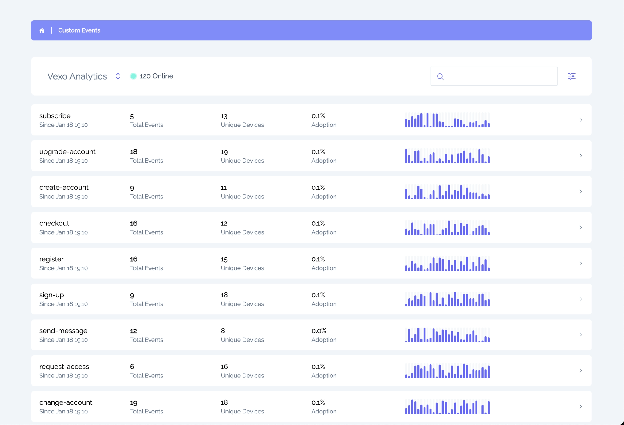
Custom events not only allow you to measure user interaction but also enable data-driven decision-making with more granular and precise insights. They allow you to segment and analyze user actions in real-time, which helps improve retention and conversions.
By including business-specific identifiers and monetary values, such as average order value and lifetime value (LTV), you can calculate critical metrics that drive decision-making and allow your team to prioritize product improvements more effectively.
How to Set Up Custom Events in Vexo for React Native (Step-by-Step)
Setting up custom events in Vexo is simple and fast. To get your team started with these events without complications, follow these steps:
1. Install the Vexo React Native SDK
Start by installing the Vexo React Native SDK and setting it up at the app's startup. This process only requires your API key and an environment flag (production or staging).
2. Set Up User Identification and Event Tracking
Next, use vexo.identify() to define the user context, and then vexo.track() to log the events you want to track. Here's a simple example:
import SDK from 'vexo-sdk';

vexo.init(apiKey);
vexo.identify({ user_id });
vexo.track("purchase_completed", payload);
3. Configure and Send Payloads
For each event, build a JSON payload with at least event_name and timestamp. You can also add additional properties like amount, user_id, and items_count.
Example JSON Payloads and Event Properties
When sending custom events, use compact and consistent payload shapes. For example, a purchase event might look like this:
{
  "event_name": "purchase_completed",
  "user_id": "u_123",
  "order_id": "o_456",
  "amount": 49.99,
  "currency": "USD",
  "items_count": 2,
  "timestamp": "2025-01-15T14:32:00Z"
}
For form submissions, include the form_id, form_step, success (boolean), and field_errors_count. For feature-usage events, attach experiment_id and variant_id for A/B testing, and include a duration_ms property for time-based metrics.
Mapping to Vexo's Analytics Schema and Best Organization Practices
To ensure smooth integration, create a mapping table that translates your internal event names and property keys into Vexo's canonical fields. Keep this table as a source of truth in your repository. Each entry should include:
- source_name
- vexo_event
- property_map
- property_types
- retention_policy
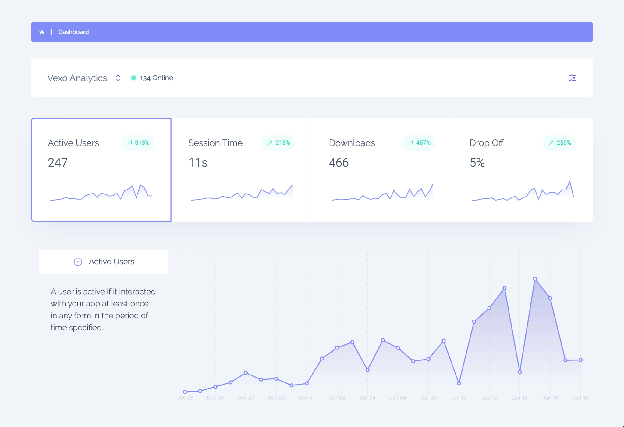
This helps prevent schema drift, ensures clean data, and simplifies data mapping. Additionally, validate event payloads in your CI pipeline to avoid issues in production.
How Custom Events Improve Product Optimization and Decision-Making
Custom events provide the data needed to optimize conversion rates at each funnel step. By tracking multiple funnel steps and analyzing the time-to-conversion, teams can identify optimization targets with high impact.
With the correct mapping, Vexo allows for segmentation by plan, cohort, or experiment. This data-driven approach helps prioritize experiments that offer the highest ROI.
Teams that instrument 8-12 business events typically reduce guesswork, enabling them to run precise funnel experiments and see measurable changes in conversion within 2-4 weeks.
Organizing Custom Events: Naming, Versioning, and Telemetry Hygiene
Maintain an event registry (in JSON or YAML format) as a living document between the frontend and analytics teams. Include the following fields:
- name
- description
- required_properties
- property_types
- owner_email
Version your registry using semantic versioning. For breaking changes, increment the major version. This ensures smooth collaboration between frontend and analytics teams, reducing schema drift.
Ensure telemetry hygiene by rejecting events that exceed property limits (recommend max 50 properties per event). Block any event with personal identifiable information (PII) unless explicitly approved.
Common Use Cases and Practical Scenarios
Custom events are essential for product optimization. Below are a few practical use cases:
| Use Case | Event Types | Primary Objective |
|---|---|---|
| Multi-Step Checkout | cart_add, checkout_start, payment_attempt, purchase_completed | Track user drop-off at each checkout step |
| Progressive Onboarding | signup_step with step_index, success, completion_time_ms | Identify which onboarding steps cause drop-off |
| Form and Fraud Detection | form_submission with field_errors_count, ip_region | Detect fraud by monitoring failed submissions |
Security, Fraud Considerations, and MFA Implementation
Track common fraud patterns like credential stuffing and automated form spam by monitoring failed_login_count and failed_form_attempts within a 10-minute window.
For Multi-Factor Authentication (MFA) implementation, send events when MFA is offered, enrolled, challenged, and verified. Include mfa_method, challenge_result, and latency_ms to measure drop-off and latency.
Final Thoughts
Custom events are the backbone of precise product optimization and faster decision-making. By tracking business-critical actions, you enable a deeper understanding of your users, helping your product team iterate faster and build better experiences.
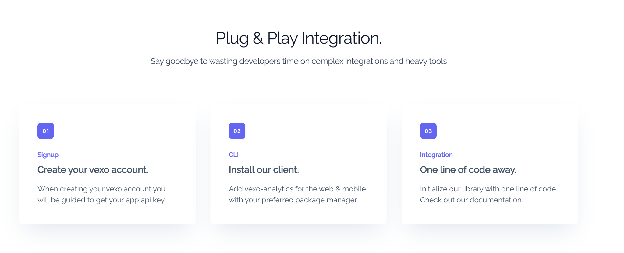
Start using custom events with Vexo today, and see how easy it is to turn data into actionable insights. The more you instrument, the faster you'll improve your product's performance.
Frequently Asked Questions
What are custom events in Vexo?
Custom events are developer-defined JSON payloads that represent business actions, such as purchases or form submissions. These events are tracked by Vexo's analytics schema to build funnels and measure product performance.
How can I send custom events using React Native in Vexo?
Install the Vexo React Native SDK, initialize it at app startup with your API key, call identify for user context, and track events using the track() function with a JSON object containing event data.
How do I organize custom events in a Vexo project?
Maintain an event registry in JSON or YAML format as a living document between frontend and analytics teams. Include name, description, required_properties, property_types, and owner_email for each event.
What properties should I include in custom events?
At minimum, include event_name and timestamp. For business events, add user_id, session_id, and relevant properties like amount, currency, items_count, or form_step depending on the event type.
