Stop Building Ignored Features: Track Real Feature Usage
Track Real Feature Usage and Optimize Your App's Performance
March 8, 2026
Jump to section
Have you ever spent weeks developing a new feature only to realize that hardly any users are actually using it? It's a frustrating experience that many developers face.
Instead of continuing to invest time and resources in features that are ignored, it's time to focus on what truly matters: tracking real user engagement.
By measuring feature adoption at both 7 and 30 days, you can validate your MVP, prevent feature bloat, and ensure your app stays aligned with Lean Startup principles.
Understanding which features truly matter to your users helps prioritize development efforts and eliminates unnecessary complexity. This approach not only validates your product's value but also enhances the user experience.
What is Feature Adoption and Which Main Entities Matter?
Feature adoption refers to the proportion of active users who successfully engage with a new feature within a specified time window, usually within 7 to 30 days. For product teams, this metric drives MVP validation, helps reduce feature bloat, and aligns with Lean Startup learning loops. The core adoption signals include:
- Event count: Total number of times a feature was used.
- Unique users engaging: Number of distinct users who triggered the feature.
- Frequency per user: Average usage per user.
Common tracking windows are:
- 7-day activation window (to measure early adoption)
- 30-day retention window (to assess long-term usage)
These signals provide both short-term activation insights and mid-term retention insights.
How Do You Measure the Adoption of New Features in a Mobile App?
To measure adoption rate, use the following formula:
Adoption rate = (unique users who triggered the feature event / active users in window) × 100
Measure adoption at both 7 days and 30 days for a comprehensive picture. Using these two windows allows you to separate trial behavior from sustained usage. Key metrics to track:
- Unique users (count): How many unique users engaged with the feature?
- Average events per user (ratio): How frequently did each user interact with the feature?
- Conversion funnel conversion %: How many users who were exposed to the feature actually completed the intended action?
Record baseline values before the feature release and compare them against the +7 and +30 days to quantify its impact.
Which Tools Can You Use to Track Features That Users Are Ignoring?
Vexo provides React Native-native analytics with zero-configuration and out-of-the-box dashboards to monitor feature events across mobile and web platforms. Key advantages of Vexo:
- No need for native code changes
- Full support for React Native and Web
- Privacy features like opt-in/out and anonymization (as detailed in the Vexo docs)
- Vexo's real-time dashboards allow you to track key metrics such as active users, session time, and downloads, offering a clear view of your app's performance.
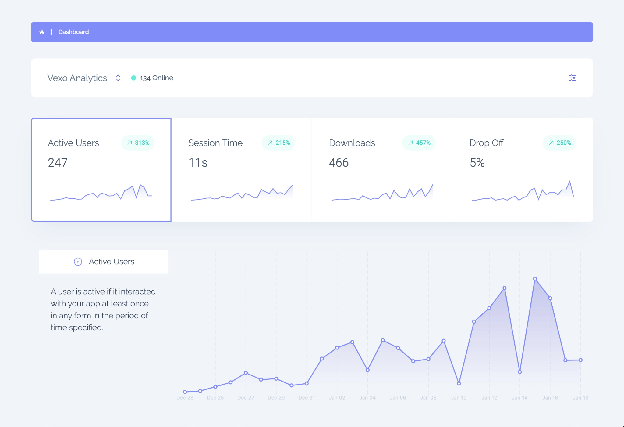
To keep the data signals clean and precise, use lightweight in-app event instrumentation (4–6 events per feature). For each feature, instrument:
- Start event (e.g., impression)
- Success event (first use)
- Cancel event (to track abandonment)
- Error event (to detect friction or issues)
How Do You Know If Users Are Actually Using the Features You've Developed?
To ensure meaningful usage, track four key acceptance events:
- Discovery (impression of the feature)
- Activation (first use)
- Repeat use (2+ uses within 7 days)
- Task completion (when the feature achieves its intended goal)
Session replays offer a powerful tool to gain direct insights into how users interact with your features. With Vexo, you can watch users' actions in real-time and decide based on actual user behavior.
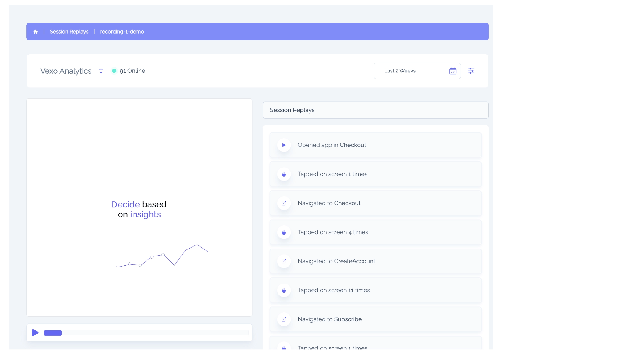
If users meet all four criteria, it demonstrates adoption beyond curiosity.
Cohort analysis can help validate feature adoption. Use 7-day and 30-day cohorts to compare retention curves. A healthy sign is if ≥20% of first-week users return to use the feature in week 4.
What Is the Impact of Unused Features on Mobile App Performance?
Unused features can have a significant impact on the performance of your mobile app. These features increase maintenance overhead, add unnecessary complexity to the binary, and can inflate the bundle size, making the app slower and harder to maintain.
Eliminating or optimizing unused features can help improve app performance, reduce developer time spent on bug fixes, and ensure a more streamlined user experience.
| Impact of Unused Features | Consequence | Benefit of Reducing |
|---|---|---|
| Increased maintenance overhead | More code to maintain, debug, and update. | Reduced time spent on bug fixes and updates. |
| Binary complexity | Larger binary size, making the app more cumbersome and slower. | Cleaner, faster binaries with improved performance. |
| Inflated bundle size | Larger app size leads to slower downloads and higher memory usage. | Reduced download size, leading to faster installations. |
| Increased dependency surface | More dependencies can lead to conflicts and technical debt. | Smaller dependency surface, easier future updates. |
What Truly Matters When Measuring Feature Adoption?
When measuring feature adoption, it's crucial to prioritize the quality of signals over the sheer volume of events. A high number of events without a corresponding increase in unique users doesn't necessarily mean the feature is being successfully adopted.
To truly understand feature adoption, there are key factors to track:
- The number of unique users engaging with the feature.
- The conversion percentage (which shows how many users complete the desired action).
- Repeat usage frequency, which ensures users continue engaging with the feature over time.
Before releasing any feature, it's essential to set clear success criteria, such as aiming for 15-25% adoption within the first 30 days or achieving a 5% reduction in churn.
Setting predefined targets helps eliminate bias when interpreting results after launch, enabling more objective decision-making based on actual usage patterns.
Best Practices to Integrate Vexo Without Increasing App Size or Harming UX
To integrate Vexo without bloating your app's size or compromising user experience, it's essential to start with minimal instrumentation.
Begin by tracking 3–4 key events per feature, ensuring that you're only collecting the most relevant data. To keep network requests low and latency minimized, batch events and use device-level buffering.
This strategy is especially effective for reducing synchronous calls, which is crucial for apps on slow connections.
Vexo is specifically designed for React Native with zero configuration and zero coding required, allowing for quick and efficient feature instrumentation.
Four Practical Examples of Using Vexo to Track Feature Usage
Example 1: Onboarding flow in a React Native app
In this example, Vexo helps track key events during the onboarding process, allowing you to assess how users interact with the initial flow. Track 4 events:
- Screen impression
- CTA tap
- Completion
- Error
Use Vexo's dashboards to measure the 7-day onboarding completion rate. Adjust based on the 7-day completion percentage to determine if the copy or interaction requires iteration for better engagement.
Example 2: New payment method rollout
When rolling out a new payment method, it's crucial to track both the success rate and user interaction to measure conversion. Track success/failure and user count.
Measure conversion lift by comparing exposed vs. control cohorts over 30 days using Vexo's cross-platform views.
Example 3: Feature flag validation for in-app editor
For validating new features with a limited user base, using feature flags can help control risk. Vexo supports tracking the success rate of feature adoption and potential issues during this stage.
Release to 10% of users and use Vexo to track activation rate and errors per 1,000 impressions. Scale only if activation exceeds 10% and the error rate remains below 1%.
Example 4: Custom analytics for a social share feature
Tracking user engagement with social sharing features can help assess their impact on the growth of the app, including conversion to new signups. Capture unique users who shared, shares per user, and downstream invites converted.
Use Vexo to track the invite-to-signup conversion over a 30-day window. This end-to-end linkage ties feature usage directly to growth.
Audit Features in Real-Time: Practical Checklist
Audit Step 1: Inventory
Start by listing all the features in your app. For each feature, assign three core events:
- Impression: When the feature is first seen by the user.
- Activation: When the feature is first used.
- Completion: When the user successfully completes the desired task or action.
Audit Step 2: Baseline
Before making any significant UI changes, capture the baselines for each feature:
- 7-day baseline: Measure how the feature performs within the first week.
- 30-day baseline: Track usage and retention over a month.
Audit Step 3: Decide
Once you've gathered your baseline data, it's time to make decisions:
- Retire features: If a feature has less than 5% 30-day adoption and hasn't shown growth for more than 6 months, consider retiring it.
- Refactor features: Features with 5–15% adoption could be worth refining. Prioritize updates based on their performance and impact.
Why Vexo is the Ideal Tool for Measuring Feature Adoption
Vexo is a powerful, zero-configuration analytics solution designed specifically for React Native and Expo apps. Unlike traditional analytics tools, Vexo offers the following benefits:
- Zero native configuration: No manual native setup required.
- Seamless Integration: It integrates effortlessly into your app with minimal setup.
- Real-Time Dashboards: With real-time tracking of feature events, Vexo provides immediate visibility into how users engage with your features.
- Comprehensive Tracking: Measure user engagement, track feature adoption rates, and optimize your app using reliable data insights.
Vexo's approach is perfect for product teams looking to stay agile. It integrates seamlessly into your app with minimal effort and offers a privacy-focused solution that supports anonymization, ensuring compliance with data protection regulations such as GDPR and CCPA.
Conclusion
Effective feature tracking is crucial for optimizing app development. By focusing on key metrics like feature adoption, conversion rates, and repeat usage, you can align your app with real user needs and improve its performance.
Vexo makes this easy by providing zero-configuration analytics, real-time dashboards, and privacy-focused solutions. Using Lean Startup principles and cohort analysis, you can track and validate feature adoption, prioritize essential features, and avoid unnecessary bloat.
Start today with Vexo to track feature adoption and make data-driven decisions with confidence.
Frequently Asked Questions
What is feature adoption and why is it important?
Feature adoption refers to the percentage of active users who engage with a new feature within a set time frame (commonly 7 and 30 days). It is a key metric for validating MVPs, reducing feature bloat, and ensuring that your app evolves in alignment with user needs.
How can I track feature adoption in my mobile app?
To track feature adoption, measure the percentage of active users who interact with a feature within 7 and 30 days after its release. Use Vexo's out-of-the-box dashboards to track key metrics such as event count, unique users, and repeat usage frequency.
What tools can I use to track feature adoption?
Vexo is a powerful tool that enables you to track feature adoption across mobile and web platforms. It provides zero-configuration analytics and real-time dashboards for seamless tracking of feature events.
How can I improve feature adoption rates?
To improve feature adoption rates, consider implementing in-app messaging, offering user tutorials, conducting A/B tests, or segmenting users to ensure the right audience sees the feature.
Why should I retire unused features?
Unused features increase maintenance overhead, add unnecessary binary complexity, and inflate bundle size. By retiring features that aren't being used, you can improve app performance and streamline your app.
